Selected work / Case study
J.A.R.V.I.S.
A desktop voice assistant in Python. Say its name, ask for something and it answers out loud.
01
How a request travels
J.A.R.V.I.S. starts as a text prompt in the terminal. Typing listen switches on voice mode, which runs in a background thread so the keyboard keeps working. From then on, every spoken request takes the same path:
- Wake wordShort clips go to speech recognition until one contains “Jarvis”
- CommandIt answers “Yes?” and records up to five seconds
- RouterThe text is matched against the registered commands
- Handler or modelA command runs directly. Anything else goes to the model
- AnswerThe reply is spoken with gTTS and played through pygame
02
A router you can extend
Commands live in a dictionary that maps a phrase to a handler. Each module in commands/ registers its own phrases at startup, so adding a skill means adding a module and leaves the core untouched.
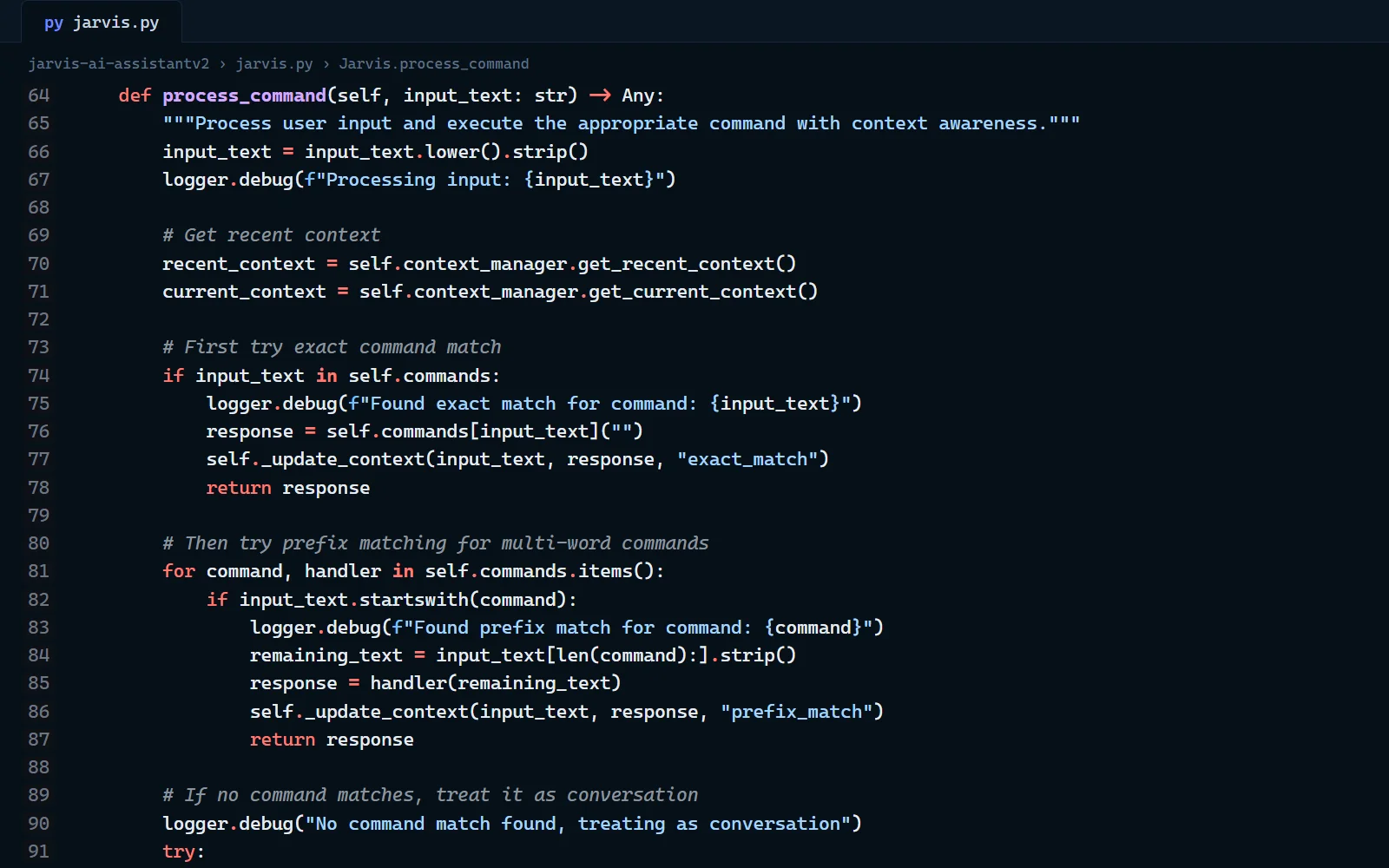
Matching runs in two passes. First comes an exact match, like clear context. Then comes a prefix match, where the rest of the sentence becomes the argument: “open github.com” finds open and passes github.com to the browser handler. If neither pass matches, the request is treated as conversation.
openorbrowsefollowed by a site opens it in the default browserlistenandstop listeningswitch voice mode on and offspeakreads any text aloudcontextandclear contextshow or reset what it remembers
03
Memory that expires
Each exchange is saved as a turn with a timestamp. The assistant keeps the last ten turns and forgets anything older than five minutes. A conversational request goes to the model together with a short system prompt for the J.A.R.V.I.S. persona and the three most recent turns.
That's enough for a follow-up like “why is that?” to make sense. It also keeps every request small, and it stops a topic from an hour ago from leaking into a new question.
04
Not listening to itself
A voice assistant that hears its own answer gets stuck in a loop. After the wake word, J.A.R.V.I.S. says “Yes?” and waits for the playback to finish. It then spends half a second measuring the room's background noise again before it starts recording the command.
The recogniser also adjusts its energy threshold as it runs, and it treats a pause of 0.8 seconds as the end of a phrase. A quiet room and a noisy one both work without changing any settings.
05
Failing out loud, politely
A program you talk to can't show a stack trace. Network errors become spoken sentences that say what went wrong, such as no connection or a timeout. If no command is heard, it says so. The voice loop pauses for a second after an error, so it can't spin in a tight loop.
A missing API key turns off conversation, but the built-in commands keep working.
06
Looking back
If I picked it up again, I'd start here:
- Listening for the wake word sends short clips to an online recogniser. A small offline wake-word model would answer faster and keep everything on the machine until the user actually speaks to it.
- Prefix matching is simple but greedy: any sentence that starts with “open” becomes a browser command. Matching on intent, or asking the model to choose a command, would handle more natural phrasing.
- The model and its reply length are fixed in the code. They belong in settings, so trying a different model doesn't mean editing the source.